
Picture this: you’ve just charged your vape pen, eager for that smooth hit, but nothing happens. Frustrating, right? Don’t worry, you’re not alone. Many vapers face this issue, and there’s usually a simple explanation. In this article, we’ll explore why your vape pen might not work after a charge. We’ll also provide some easy fixes to get you back to vaping quickly.
Your Vape Pen Is Turned Off
It might sound obvious, but sometimes, the simplest explanation is correct. Many vape pens have a safety feature that turns them off automatically after a period of inactivity. It is designed to prevent accidental activation in your pocket or bag. If your vape pen isn’t working, the first check is whether it’s turned on.
Most vape pens use a simple five-click system to turn on and off. Try clicking the main button five times in quick succession. If you see lights flashing or hear a beep, congratulations! You’ve just solved your problem. If not, don’t worry – we have more troubleshooting steps to try.
Remember, different vape pen models may have slightly different activation methods. Some might require three clicks instead of five, while others might have a dedicated power button. For more clarification, consult a good vape shop online for specific instructions.
Your Vape Pen Isn’t Detecting the Pod or Cartridge
Another common issue is that your vape pen isn’t detecting the pod or cartridge. It can happen for a few reasons. The most frequent cause is that the pod or cartridge isn’t correctly connected to the battery. Even a slight misalignment can prevent your vape pen from working.
To fix this:
- Try removing the pod or cartridge and reinserting it.
- Make sure it clicks into place firmly.
- If you’re using a threaded cartridge, ensure it’s screwed in tightly but not over-tightened.
Over-tightening can damage the connection points.
Sometimes, debris can accumulate on the connection points, interfering with the electrical contact. Use a cotton swab lightly dampened with isopropyl alcohol to clean both the battery connection and the bottom of the pod or cartridge. Be gentle to avoid damaging the delicate components.
If you’ve tried these steps and your vape pen still isn’t detecting the pod or cartridge, there might be an issue with the pod or cartridge itself. Try using a different one if you have a spare. If the new one works, you’ve identified the problem.
Your Vape Pen Isn’t Charged
It might seem counterintuitive, but your vape pen might not fully charge even after plugging it in. There are a few reasons this could happen. First, make sure you’re using the correct charger. Using a charger not designed for your specific vape pen can lead to incomplete charging or even damage to your device.
Check that the charging port is clean and free from debris. Lint or dust can accumulate in the port, preventing a good connection. Use a toothpick or a can of compressed air to clean out the port gently.
If you’re sure you’re using the correct charger and the port is clean, the charging cable or wall adapter might be the issue. Try using a different USB cable or wall adapter. Sometimes, these components can fail without any visible signs of damage.
Lastly, consider how long you’ve been charging your vape pen. Most vape pens take about 1-2 hours to charge fully. If you’ve only charged it for a few minutes, it might not have enough power to function properly.
Your Cartridge Is Clogged
If your vape pen is turning on but you’re not getting any vapor, the issue might be with your cartridge. Over time, residue from the vape liquid can build up in the cartridge, clogging the airflow path. It is widespread with thicker vape juices or if you haven’t used your vape pen in a while.
To unclog your cartridge, take a few dry pulls without activating the battery. It can help dislodge any blockages. If that doesn’t work, you can try gently heating the cartridge. Use a hairdryer on its lowest setting, or roll the cartridge between your hands to warm it slightly. It can help thin out the liquid and clear the blockage.
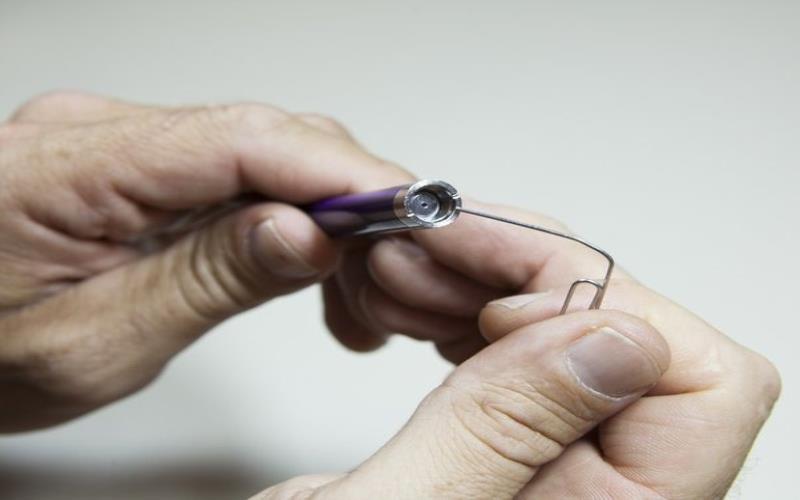
For more stubborn clogs, you should clean your cartridge. Remove it from the battery and use a thin object like a paperclip to clear any visible blockages in the mouthpiece. Be very gentle to avoid damaging the cartridge.
If none of these methods work, it might be time to replace your cartridge. Even with proper care, cartridges don’t last forever and will eventually need to be replaced.
Your Vape Pen’s Battery Is Finished
All rechargeable batteries have a limited lifespan. If you’ve had your vape pen for a while and it’s suddenly not holding a charge or not working, the battery might have reached the end of its life.
Most vape pen batteries last for about 300 to 500 charge cycles. If you’re a heavy user, charging your device multiple times daily, you might reach this limit faster than you think. Signs of a failing battery include shorter battery life between charges, the device getting unusually hot during use or charging, or the battery swelling or deforming.
Unfortunately, if your battery fails, there isn’t much you can do but replace it. Some vape pens feature removable batteries, while others require replacing the entire unit. Check your user manual or the manufacturer’s website to learn about battery replacement alternatives for your model.
To make your vape pen’s battery last longer:
- Avoid overcharging.
- Once your device has completed its charging cycle, unplug it.
- Keep your battery level between 20% and 80% for longevity.
Extreme temperatures can also harm batteries, so avoid storing your vape pen in extremely hot or cold situations.
Your Vape Pen Overheated While Charging
Overheating is a serious issue that can prevent your vape pen from working and pose safety risks. Vape pens can overheat for various reasons, including using an incompatible charger, charging too long, or exposure to high temperatures.
If your vape pen feels unusually hot after charging, do not use it. Let it cool down completely before attempting to turn it on. Using an overheated device can damage the battery or other internal components.
To prevent overheating, always use the charger with your vape pen or one specifically recommended by the manufacturer. Avoid charging your device in direct sunlight or near heat sources. Don’t leave your vape pen charging overnight or for extended periods.
Some vape pens have built-in overheating protection that shuts off the device if it gets too hot. If this happens, let the device cool down before using it again. If overheating occurs frequently, it might indicate a problem with your device or battery, and you should consider getting it checked by a professional or replacing it.
Conclusion
It can be annoying to run into problems with your vape pen, but most of them have straightforward fixes. Understanding these frequent difficulties and how to address them will allow you to keep your vape pen running properly and have a better vaping experience.
Remember, proper maintenance is critical to preventing many of these issues. Clean your vape pen regularly, store it properly, and handle it carefully. If you’re consistently having problems with your device, it might be time to invest in a new one. Technology in the vaping industry is constantly improving, and newer models often offer better performance and reliability.
Lastly, always prioritize safety when using and troubleshooting your vape pen. If you’re unsure about anything or if your device shows signs of damage, it’s better to err on the side of caution and seek professional advice or consider a replacement.
Happy vaping, and may your clouds be ever fluffy and your hits always smooth!

Rockies Ripple is the founder and lead writer behind the independent blog tvplutos.com